

When it comes to programming languages, Java stands out as one of the most popular and versatile choices for developers worldwide. From powering web applications and mobile apps to large enterprise systems, Java has been around for decades and shows no signs of slowing down. Whether you’re a beginner venturing into programming or an experienced developer setting up a new environment, installing Java is the first crucial step.
In this article, we’ll walk you through the installation process on different operating systems—Windows, macOS, and Linux—so you can start coding in no time.
What Is JDK?
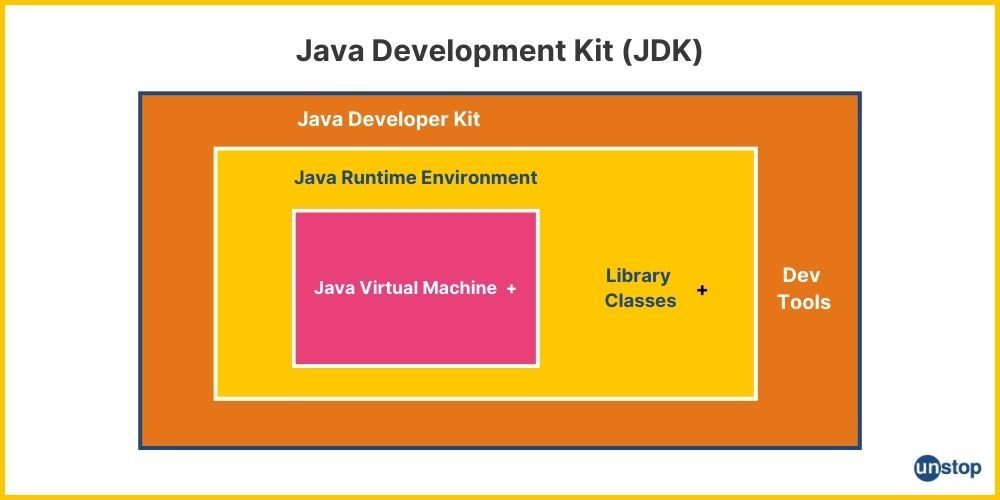
The Java Development Kit (JDK) is a comprehensive software development environment provided by Oracle (and other vendors) that allows developers to create Java applications. It includes the software tools necessary for compiling, debugging, and running Java programs, such as:
- Java Runtime Environment (JRE): This is the environment needed to run Java applications. It contains the Java Virtual Machine (JVM), core Java classes, and support files.
- The Java compiler (javac): It turns Java source code (.java files) into bytecode (.class files) that the JVM can run.
- Development Tools: The JDK comes with tools for developing, debugging, and monitoring Java applications, including : Java Debugger (jdb), Java Profiler (jvisualvm), Java Archiver (jar), Java Documentation Generator (javadoc), Java Compiler (javac), Java Interpreter (java).
Java developers generally utilize the JDK to create new Java apps and applets. However, the JRE (Java Runtime Environment) is required to run Java programs on a system. It includes the JVM and the core Java libraries but does not include the development tools like the compiler or debugger that are part of the JDK.
JDK Variants
JDK (Java Development Kit) has various variants tailored to different development needs. Understanding these variants can help you choose the right JDK for your projects. Here are some common JDK variants:
- OpenJDK: OpenJDK is an open-source implementation of the Java Platform, Standard Edition (Java SE) that offers the Java Runtime Environment (JRE) and tools for Java development. It is supported by a thriving community of developers and organizations.
- Oracle JDK: Oracle JDK is the official implementation of the Java SE universal platform developed by Oracle Corporation. It includes extra proprietary tools and features that are not found in OpenJDK, like Java Flight Recorder and Java Mission Control. Although Oracle JDK was formerly the most widely used JDK distribution, licensing and distribution policies have changed recently.
- AdoptOpenJDK: The AdoptOpenJDK community maintains AdoptOpenJDK as a distribution of OpenJDK. OpenJDK's prebuilt binaries for a range of systems and architectures simplify installation and usage. For Java developers, AdoptOpenJDK offers frequent upgrades and long-term support (LTS) releases, guaranteeing stability and security.
- Amazon Corretto: Offered by Amazon Web Services (AWS), Amazon Corretto is a production-ready, multiplatform, free distribution of OpenJDK. Security updates, performance improvements, and long-term support are all included. AWS provides services and support for Amazon Corretto, which is intended for usage in production settings.
- Zulu JDK: Zulu JDK is a fully tested, commercially supported distribution of OpenJDK provided by Azul Systems. It offers high-quality, certified builds of OpenJDK for various platforms, including Windows, macOS, Linux, and Docker containers. Zulu JDK provides regular updates, security patches, and performance optimizations.